

Convert a Pine v4 Script to v5 in Odin: 3 Steps
The three steps to take a script from v4 to v5, the fact that v1 to v4 scripts already run in Odin as they are, and which Phoenix accounts can use Odin.
To convert a Pine v4 script to v5 in Odin, paste it into Odin's Pine editor and use Convert to v5. Converting is optional, because Odin already runs v1 to v4 scripts, in its Pine worker, as they are. Pine Script is TradingView's scripting language for indicators, and Odin is the trading platform from Phoenix Trader Funding.
- What a Pine v4 script is and how to spot one
- How to convert a Pine v4 script to v5 in Odin
- You can run a v4 script in Odin without converting it
- Two Pine details to check on a converted plot
- Which Phoenix accounts can use Odin
- How to check a converted script before you trade off it
- Who this helps
- Frequently asked questions
What a Pine v4 script is and how to spot one
A Pine script is a program written in Pine, and the ones in this guide draw an indicator on a chart. Its version is the edition of the language it was written for: v4 is the fourth edition and v5 the fifth.
You can read the version off the script. A v4 script opens with a comment line that reads @version=4, and a v5 script's reads @version=5. If the first line of yours reads @version=4, this guide is about your script.
A ta.* function is one of Pine's technical analysis functions, the ones whose names start with ta and a dot in v5. A simple moving average is the plainest example: v4 wrote it as sma, and v5 writes the same function with ta and a dot in front of the name.
Pine to Pine, not Pine to something else. Odin runs Pine Script indicators directly, so nothing gets rewritten into another language, as the Help Center page on Odin's key features puts it. The conversion in this guide goes from one Pine version to the next.
How to convert a Pine v4 script to v5 in Odin
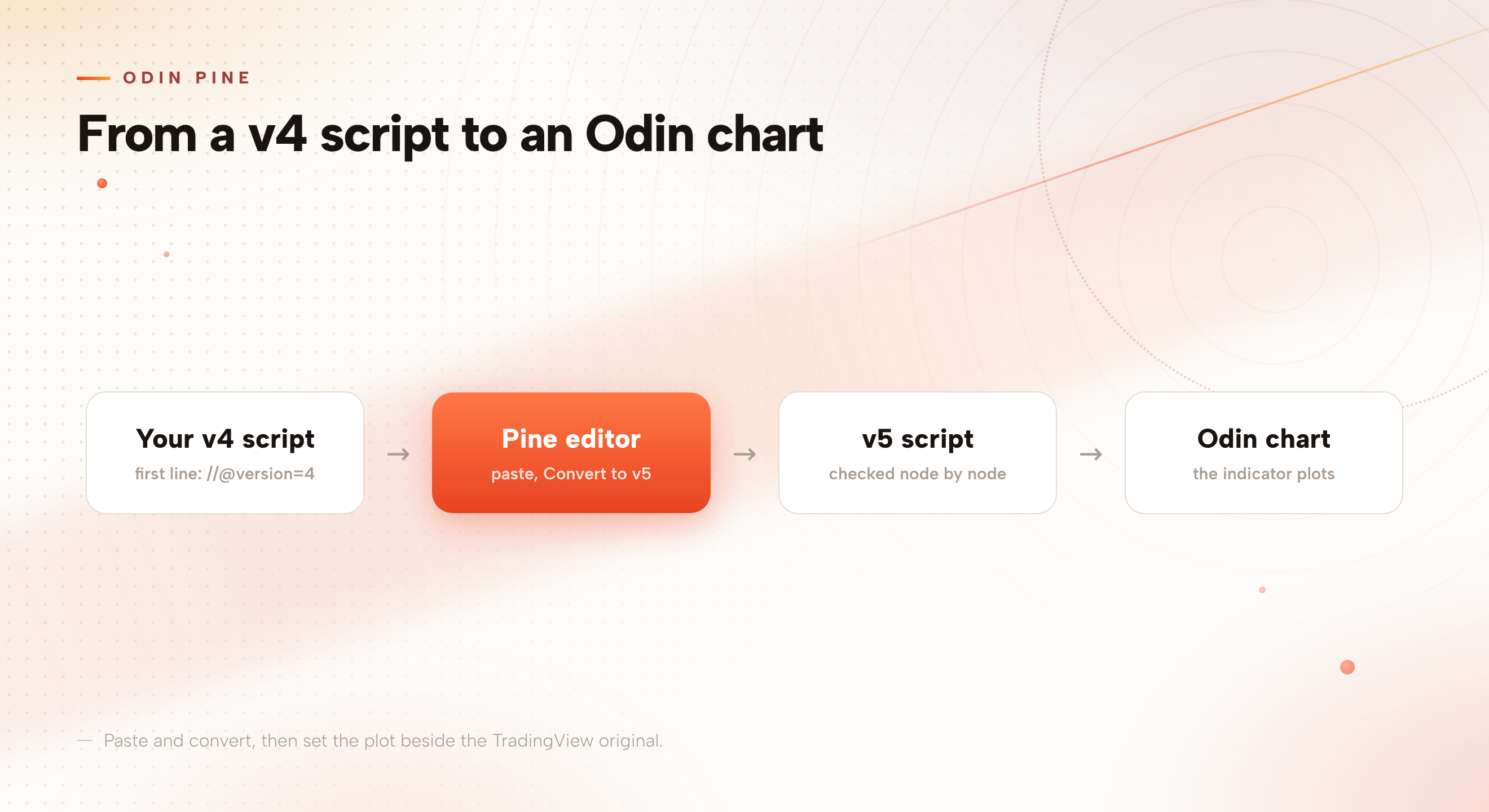
Three steps take a v4 script to v5.
- Copy the v4 scriptCopy it whole from wherever you keep it, such as the Pine editor on TradingView. The first line shows its version.
- Paste it into Odin's Pine editorOpen the Pine editor in Odin and paste the whole script in.
- Use Convert to v5Convert to v5 sits in Odin's Pine editor. It turns the pasted script into v5.
That range means a v2 or a v3 script goes through the same three steps as a v4 one. The same update added 25 more ta.* functions to Odin's Pine.
The conversion is checked node by node against the program Odin runs, which means one element of the script at a time. The plot is still yours to look at, and the checklist further down shows what to look at.
You can run a v4 script in Odin without converting it
A v4 script runs in Odin without converting: Odin runs TradingView Pine scripts of versions 1 to 4 only in its Pine worker. The reason to convert is a contrast Odin's own Pine Library shows: its v5 port of one indicator runs everywhere in Odin, Thor, Phoenix's trade copier, and pop-outs included.
That indicator is LazyBear's Squeeze Momentum. The original is a v1 to v4 script, so it runs only in the Pine worker. Odin's Pine Library, the set of ready Pine indicators that comes with Odin, carries it as a v5 port, and that port runs everywhere.
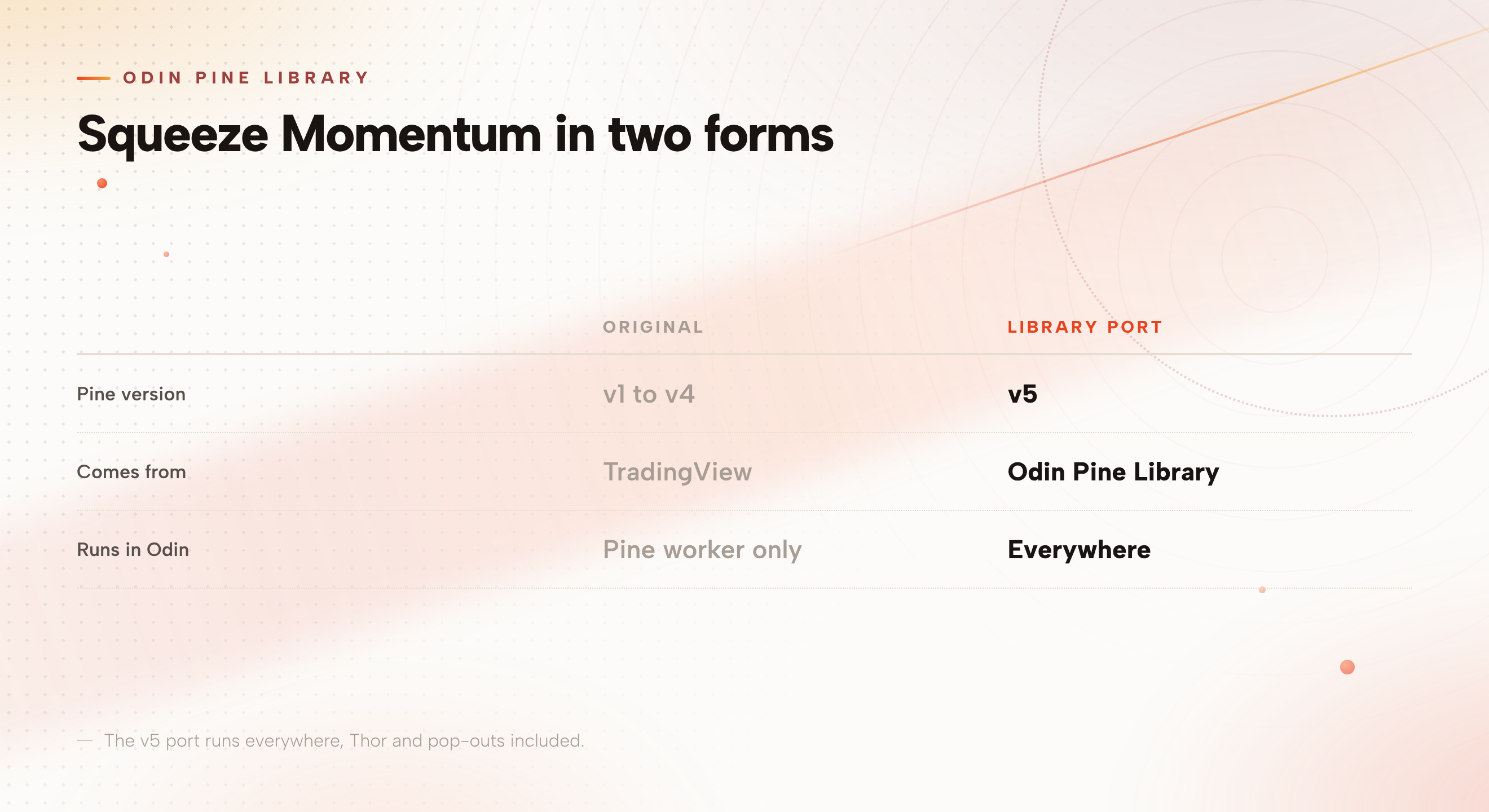
Pop-outs are windows you pull out of Odin's main window. The contrast describes the Library's port, not every converted script, so to learn whether your own script runs in Thor or a pop-out, convert it and open it there.
Two Pine details to check on a converted plot
na is Pine's marker for a bar that has no value, such as the first bars of a 20-bar average, which cannot be worked out yet. Odin's Pine treats na as TradingView does in the 16 functions TradingView marks as ignoring it.
VWAP is the volume weighted average price: the average price over a period, weighted by the volume traded at each price. In Odin's Pine, the VWAP function in the ta family restarts each day in its form that takes a source and an anchor, so a VWAP line made that way starts fresh each day.
Both are worth a look when you set a converted plot beside the TradingView original, which is what the checklist below does.
Which Phoenix accounts can use Odin
Odin works on both feeds a Phoenix Trader Funding evaluation runs on, TFeed and dxFeed. TFeed is Phoenix's own execution feed, with no market data. Classic is sold on TFeed and on dxFeed, so a Classic trader can use Odin on either. Daily, Spark and Merit exist only on TFeed, and they use Odin there.
| Account | Feed | Odin |
|---|---|---|
| Classic | TFeed or dxFeed | Yes, on either feed |
| Daily | TFeed only | Yes |
| Spark | TFeed only | Yes |
| Merit | TFeed only | Yes |
On the Merit accounts page, Odin is one of the tools listed with the account.
How to check a converted script before you trade off it
A converted script is still a new indicator on your chart, so treat its first session like any other new indicator. Put it beside the same indicator on TradingView, on the same symbol and timeframe, and compare the two.
- The first bars, where na values sit
- Where the converted VWAP line restarts, against the TradingView original
- The last few signals you trade off, bar by bar
Keep the original v4 text saved, so you can paste it again if you want to start over.
Once the script plots, the rest of Odin's setup, hotkeys, quick sizes and saved layouts, is covered in our Odin settings guide.
Converting is a chart task. It changes what you plot, not the rules of your Phoenix Trader Funding account. This guide describes platform features. It is education, not financial or trading advice, and trading futures carries a risk of loss.
Who this helps
If you keep Pine indicators from TradingView and your newest one is v4 or older, it already runs in Odin as it is. If your scripts are already v5, you have nothing to convert.
If you never use custom indicators, none of this changes your trading, and the Pine editor is a tool you can leave alone.
Frequently asked questions
How do I convert a Pine v4 script to v5 in Odin?
Paste the script into Odin's Pine editor and use Convert to v5. It turns a pasted v1 to v4 script into v5, so scripts of earlier versions go through the same steps.
Does Odin run Pine v4 scripts?
Yes. A v4 script runs in Odin without being converted, because Odin runs TradingView Pine scripts of versions 1 to 4 only in its Pine worker.
Do I have to convert my Pine v4 script to v5 in Odin?
No. A v1 to v4 script already runs in Odin. The reason to convert is the contrast the Library shows: its Squeeze Momentum v5 port runs everywhere, Thor and pop-outs included, and the v1 to v4 original runs only in the Pine worker. That is the port, not every converted script, so convert yours and open it in a pop-out to see.
Does Odin have Squeeze Momentum?
Yes. Odin's Pine Library includes LazyBear's Squeeze Momentum as a v5 port that runs everywhere in Odin, Thor and pop-outs included.
Which Phoenix accounts can use Odin for Pine scripts?
Classic, Daily, Spark and Merit can all use Odin. Classic works on TFeed or dxFeed, and Daily, Spark and Merit use Odin on TFeed, the only feed they exist on.
What is a ta.* function in Pine?
A ta.* function is one of Pine's technical analysis functions, such as the simple moving average, which v5 writes with ta and a dot before sma. Odin's Pine added 25 more of them alongside Convert to v5.
Pick the Phoenix Trader Funding account you want to trade, then bring your Pine scripts to Odin.
Compare the evaluationsNew funded-account types are trialled at Phoenix Labs as real, tradable accounts before they join the permanent offer. The ones that work graduate.