

Futures Trading Journal: What to Log in 3 Parts of Your Day
What to log before, during and after a session, and how Saga, free with every Phoenix account, keeps it for you.
A futures trading journal records each session in three parts: your plan before the open, your trades during it, and your review after the close. Keep all three and you can set what you planned beside what you did. Saga, the AI trading journal included free with every Phoenix Trader Funding account, logs your trades and records the other two parts as video.
- What a futures trading journal is for
- Part 1: Before the open, log your plan
- Part 2: During the session, log each trade and why
- Part 3: After the close, log your review
- What a month of entries shows
- How to keep a trading journal going
- How Saga keeps the journal for you
- How your trades reach Saga on TFeed and dxFeed
- Import your past trades into Saga
- Who this helps
- Frequently asked questions
What a futures trading journal is for
A futures trading journal is the record you keep of your own trading: what you planned, what you did and what you concluded, one session at a time. It is not a diary and it is not a list of trades. Its job is to show you patterns in your own habits that you cannot see from inside a single session.
Memory is the reason you need one. After a session you remember the trades that mattered and the story you told yourself about them. A plan written before the open and notes made on the day hold what you actually thought, rather than what you remember thinking once you know how it turned out.
A journal pays off slowly, so the habit matters more than any single entry. Keep each entry small enough that you will still be writing it in three months.
Part 1: Before the open, log your plan
The first entry is written before the first order. It is your plan for the session, and the only entry the day's result cannot color.
A key level is a price where you expect the market to react, such as support or resistance. Your plan names the ones you are watching, for example support on the Nasdaq at 21654.25, and says what you will do if price gets there.
- The key levels you are watching, and what you will do at each
- The setups you will take, and the ones you will skip
- The most you will lose on the day before you stop trading
- What would keep you out of the market, such as a scheduled news release
- How much room your account has before its drawdown limit
The last item is the one a prop firm account adds. If the drawdown rule is unfamiliar, the Phoenix Labs answer on what a trailing drawdown is explains how the limit moves.
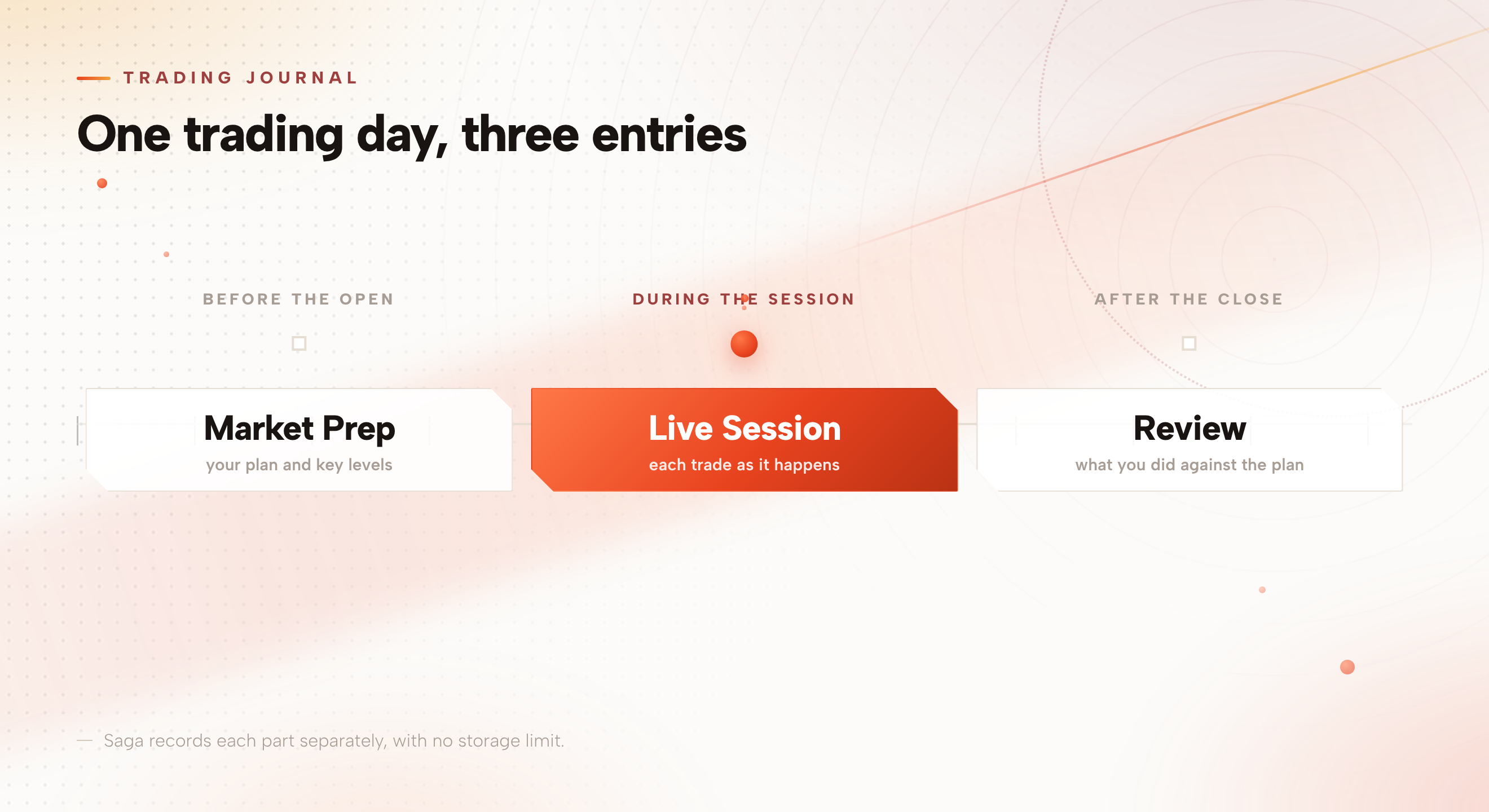
Saga's Market Prep recording is built for this entry. You record your analysis and preparation before the session opens, and Saga can pull the key information out of what you said. Say there is support on the Nasdaq at 21654.25 and that level is filled into Key Levels for the day without you typing it.
Part 2: During the session, log each trade and why
The second entry is one row per trade. Keep each row short, because you write it with a position open or just after it closes. The last field in the table below is the most useful one, because it splits the trades you planned from the ones you did not.
| Field | What to write | Why it earns its place |
|---|---|---|
| Instrument and side | The contract, and long or short | Shows which markets you really trade |
| Entry, stop and exit | The three prices | Shows the risk you took against the reward you aimed for |
| Time | Clock time in and out | Shows which hours your plan holds up in |
| Size | Contracts traded | Shows whether size drifted after a win or a loss |
| Setup | The setup's name, taken from your plan | Groups trades so patterns can appear |
| Reason | One line, written at the time | Stops your reasoning being rewritten afterwards |
| State | One word for how you felt, such as calm or rushed | Often explains the trades that were not in the plan |
| In the plan? | Yes or no | Splits planned trades from impulse trades |
Saga logs the trade itself as it happens, with no export, no CSV and no screenshot. The setup, the reason, the state and the in-the-plan mark are still yours to add, a few words per trade.
Saga's Live Session recording is the one for this part of the day: it captures the session itself as it happens.
One column is worth adding if you trade a prop firm account: how much room you had before your drawdown limit when you entered. It explains trades that look odd afterwards, such as a smaller size late in a losing run.
The account you most need a journal for is usually the one you are still learning on. Saga's NinjaTrader support includes SIM accounts, so a Sim101 account is journaled exactly like a funded one.
Part 3: After the close, log your review
The third entry closes the loop. Write it once the session ends, while the day is fresh, and keep it to three questions.
- Did you follow the plan?Count the trades you marked as in the plan and the ones you did not. Look at the out-of-plan trades first.
- What was your best decision and your worst?Name one of each, with the reason, in a sentence apiece.
- What is the one thing you will change tomorrow?Pick one. A list of five changes is a list you will not make.
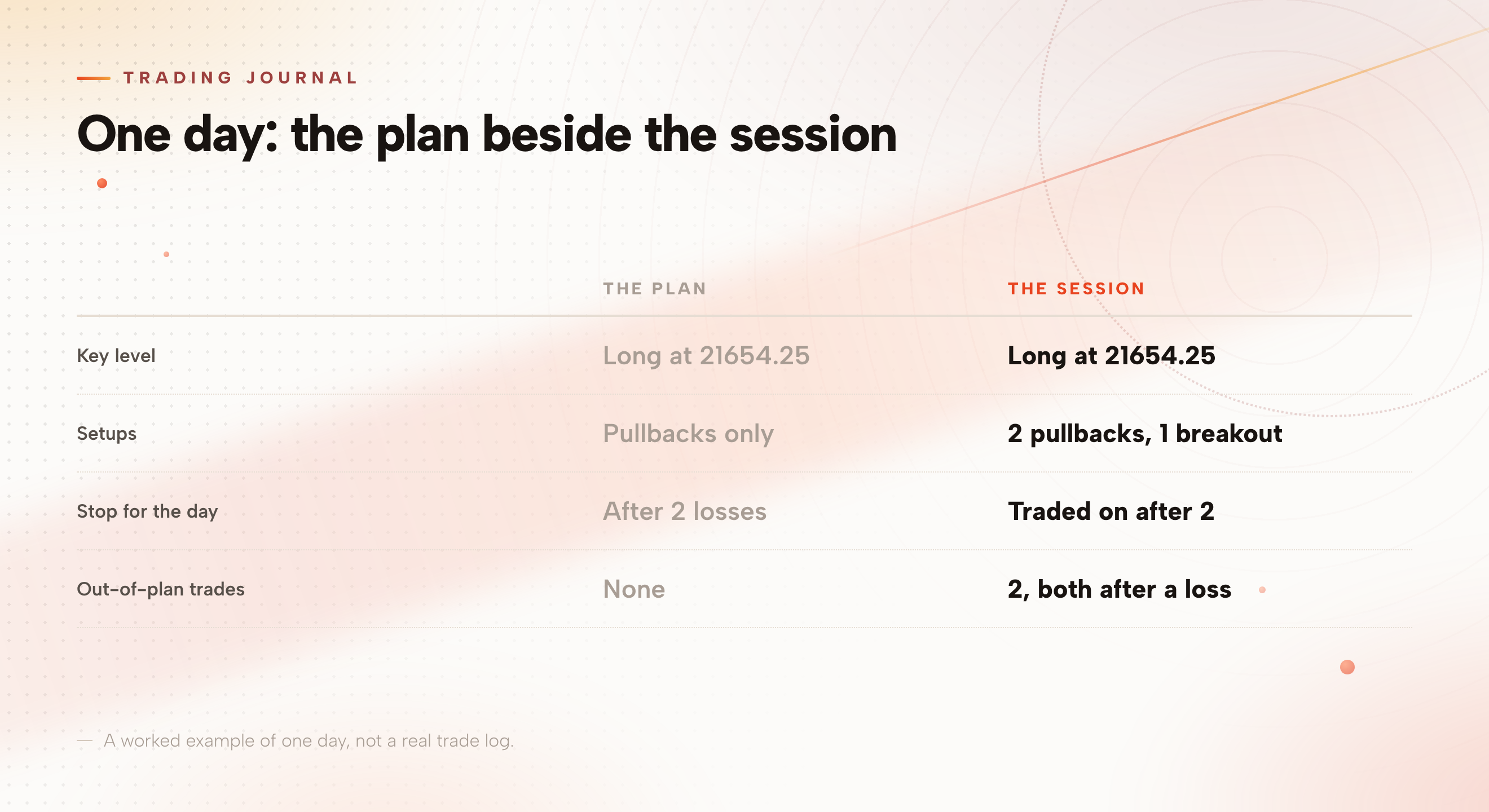
Both out-of-plan trades came straight after a loss, the breakout after the first and the second pullback after the second, which is the first pattern the next section tells you to look for.
Saga's Post-Market Analysis recording holds this review as video, recorded once the session has closed. You can also have any recording analysed, and Saga extracts the key information from what you said and fills it into your journal.
Recording helps for a reason a spreadsheet cannot match. Watching yourself describe a level in the morning and then trade something else lands harder than a row of numbers, and it is the quickest way to see the gap between your plan and your execution.
Write the review the same day. A review written next week records the version of events you have since tidied up.
What a month of entries shows
One session tells you little, and a month of entries gives you a first read. Three patterns are worth checking for, and each one can only be seen across many sessions.
- Out-of-plan trades that follow a losing trade
- Size that grows or shrinks after a win or a loss
- The hours of the day when your trades match the plan, and the hours when they do not
None of these shows up in a single trade. They show up when you read the same fields, written the same way, across weeks of sessions, which is why a short and consistent entry beats a long one you stop writing.
How to keep a trading journal going
The best journal is the one you keep up. Five habits make that more likely.
- Keep each entry short enough to finish in a few minutes
- Log losing days with the same care as winning days
- Write the plan before the open, never after your first trade
- Read a week of review notes together, once a week
- Add a new note beside an old entry instead of rewriting it
A journal records your trading, it does not improve it on its own, and nothing in it is a signal to trade. This guide describes a journaling method and platform features. It is education, not financial or trading advice, and trading futures carries a risk of loss.
How Saga keeps the journal for you
Saga is the AI trading journal built into the Phoenix dashboard, so there is nothing to install. It is included free, forever, with every Phoenix Trader Funding account, and the Help Center answers the common Saga questions.
Before you record, you set up a scene: your screen, your webcam and your preferences. Recordings save automatically, so nothing depends on your own machine. There is no quota to manage, which means you never have to decide whether a session is worth recording.
The three recordings are separate on purpose. You can go back to what you planned without sitting through what you did.
How your trades reach Saga on TFeed and dxFeed
How trades arrive depends on the feed your account runs on. Both routes end in the same journal.
| Your feed | How your trades reach Saga |
|---|---|
| TFeed | Through Thor's connections, across every vendor Thor supports |
| dxFeed | By trading on Odin with your dxFeed connection |
Real-time sync on dxFeed is tied to trading on Odin. If you place your trades on another platform with your dxFeed connection, they will not stream into Saga the same way. Odin is Phoenix's trading platform, and our Odin settings guide covers setting it up.
Import your past trades into Saga
A journal is more useful with history behind it. Importing is how you get three months of your own trading into Saga on the first day, instead of waiting three months to have it.
Saga imports existing trades from a CSV, taken from your datafeed's Orders export in ProjectX, Rithmic or Tradovate.
- Export your ordersUse the Orders export to produce the CSV. It has to be that export: an account statement or a positions report is a different file and will not import.
- Import it into SagaUpload the file and your trades load automatically. Hand over the file as your platform produces it, with nothing to reformat.
Who this helps
If you trade a Phoenix account and keep no record beyond your platform's trade list, the three part entry above is a place to start, and Saga does the logging for you. If you already keep a journal somewhere else, importing your orders gives Saga a real history on day one.
If you will never read what you log, a journal is wasted effort, and an automatic one does not change that.
Frequently asked questions
What should a futures trading journal include?
Three entries for each session. Before the open, your plan: key levels, the setups you will take and your risk limit for the day. During the session, one row per trade: instrument, entry, stop, exit, time, size, setup, reason and whether it was in the plan. After the close, a short review of what you did against the plan.
Do I have to log trades by hand in Saga?
No. Saga logs your trades in real time, so they appear as they happen, with no export, no CSV and no screenshot. What stays yours to write is the plan, the reason and the in-the-plan mark on each trade, and the review. Saga can record the plan and the review as video.
Is Saga free?
Yes. Saga is included free, forever, with every Phoenix account, and it is built into the Phoenix dashboard.
Can I import my past trades into Saga?
Yes. Saga imports existing trades from a CSV, taken from your datafeed's Orders export in ProjectX, Rithmic or Tradovate. It has to be the Orders export, because an account statement or a positions report is a different file and will not import.
Can I use Saga with a dxFeed account?
Yes. Saga sits inside your Phoenix dashboard, and trading on Odin with your dxFeed connection gives you real-time sync. Real-time sync on dxFeed is tied to trading on Odin, so trades placed on another platform will not stream in the same way.
Can I journal a practice account in Saga?
On NinjaTrader, yes. Saga's NinjaTrader support includes SIM accounts, so you can journal a Sim101 account exactly as you would a funded one.
Pick the Phoenix Trader Funding account you want to trade. Saga, the journal, comes with every one.
Start at phoenixtraderfunding.comNew funded-account types are trialled at Phoenix Labs as real, tradable accounts before they join the permanent offer. The ones that work graduate.